Hotel PMS and POS in one

Hotel Management System for hotels, lodges and guest houses

ArmPOS is a hotel management system for your rooms, reservations, housekeeping, the guest’s bill and your restaurant and bar. It runs in the browser on a phone, tablet or computer, and guests pay deposits by mobile money or card.

Free plan · No card needed

The ArmPOS hotel management system’s front desk calendar: rooms by type, each night’s price and rooms free, bookings from the desk and booking sites, and the rooms that need cleaning

On the phone you already have

The front desk on any phone, and a page for every guest

Open the front desk in the browser on Android, iPhone, a tablet or a computer, and install it like an app. Each guest gets a page for their stay to register, see the bill and pay, with no app and no account.

  • Works onAndroid & iPhone
  • Guests needno app
The ArmPOS front desk on a phone: tonight’s rooms taken and free, the guests leaving and arriving, the rooms to clean, and a check-out button for each guest
Why ArmPOS for hotels

One system for the rooms, the desk and the restaurant

Most small hotels keep bookings in a diary, the bar on a separate POS and the bill on paper. ArmPOS puts all three on one guest bill.

Booking sites by calendar link

ArmPOS reads Booking.com, Airbnb, Expedia, Agoda and Vrbo calendars every 15 minutes, and gives each site a calendar link of your booked nights.

  • Booking.com
  • Airbnb
  • Expedia
  • Agoda
  • Vrbo

Registration card before arrival

Send the card with the booking confirmation or two days before arrival. The guest fills it in on their phone, and the ID number is masked.

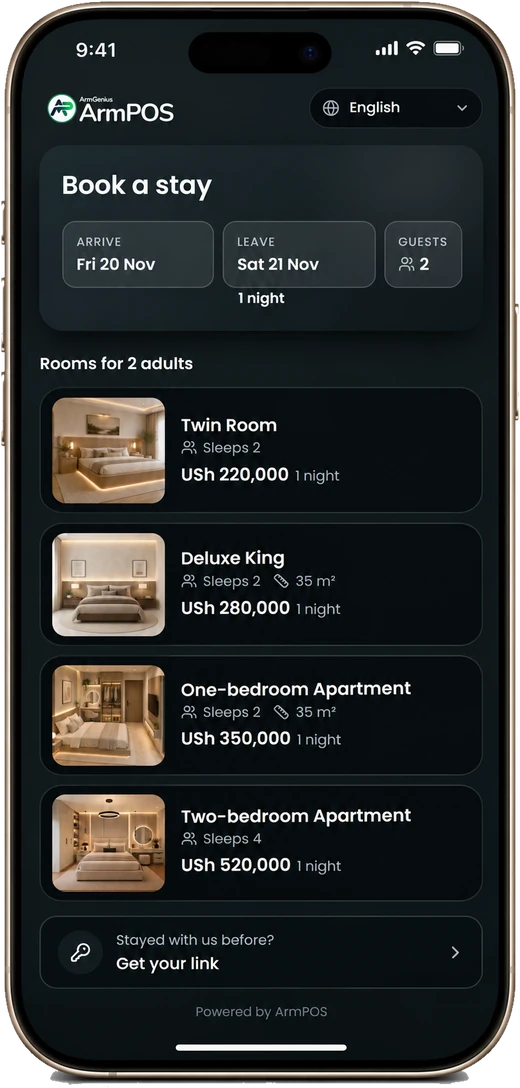
A hotel’s own booking page on ArmPOS, on a phone: the guest picks the dates and the number of guests, and sees each room with its photo and price
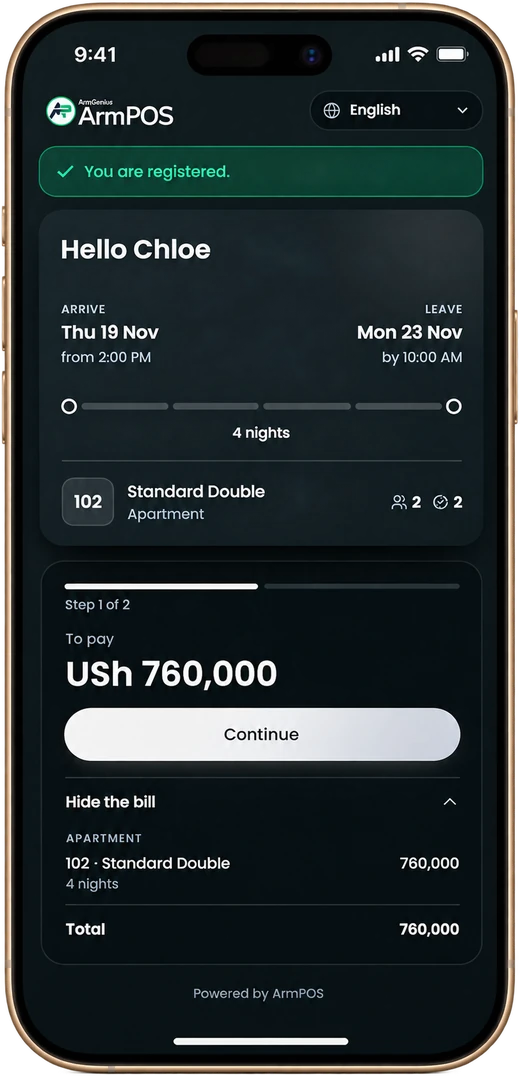
A guest’s own page for their stay on ArmPOS, after registering: the dates, the room, the amount to pay and the bill
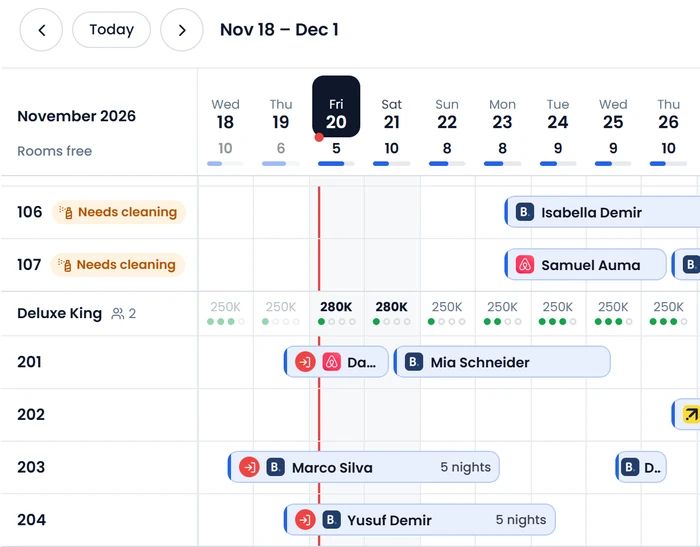
The ArmPOS front desk calendar: rooms down the side, nights across, the rooms free each night, and one bar for each booking

No night sold twice

Every room and every night is one record. ArmPOS refuses a second booking for the same room and night, at the desk and from booking sites.


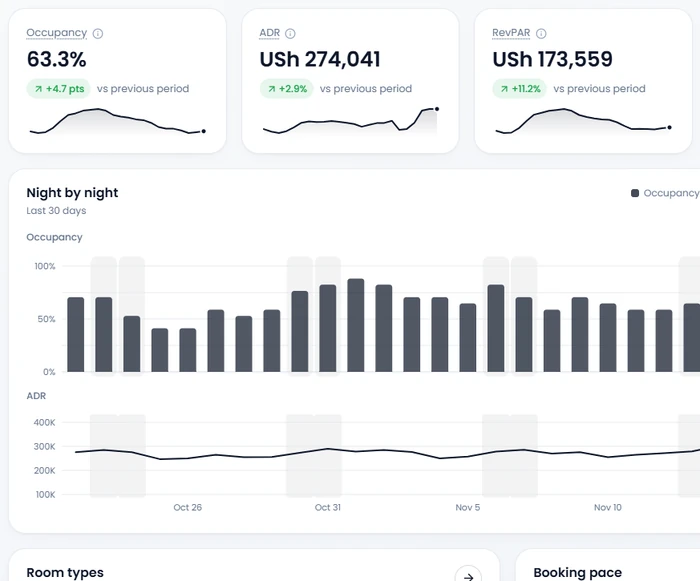
The ArmPOS hotel dashboard’s Rooms view: occupancy, ADR and RevPAR against the previous period, and occupancy night by night

Occupancy, ADR and RevPAR

The hotel dashboard shows tonight, occupancy, average daily rate, RevPAR, the guest ledger and where your bookings come from.

The bar on the room’s bill

At the restaurant or bar, choose Charge to room and pick a checked-in guest. The sale lands on their bill beside the room nights.

How it works

From the first booking to the night’s figures

Pick the dates and the guests, and New booking shows only the rooms free for those nights, each with its price. Then add the guest, the registration card and the payment.

Open a tab for a guest or a table and add each round to it. Drinks marked 18+ ask for an ID check first, and only a manager can take off a drink that was sent.

Take orders to eat in, take away or deliver: a table and its guests, or a phone and a place with a delivery fee. Send the order to the kitchen and split the bill between guests. Every open order stays in view.

The dashboard shows tonight’s occupancy, ADR and RevPAR, revenue against the last period, what guests in the house still owe, and how full the next 14 nights are.

New booking in the ArmPOS hotel management system: the stay’s dates and guests, then the free room types with photos, free room numbers and the night’s price

Hotel PMS and hotel POS

A hotel PMS and a hotel POS in one

A PMS (property management system) sells and runs rooms. A POS sells food, drink and goods. Most small hotels buy them separately and add up the bill by hand.

PMS: the rooms

Front desk

  • Calendar and reservations
  • Check-in, registration cards and house rules
  • Housekeeping: clean, to clean, out of order
  • Booking sites by calendar link
  • Deposits, pay links and the guest’s page
Charge to room One guest, one bill: nights, food and drink

POS: the restaurant and bar

Sales points

  • Tables and service charge
  • Kitchen display
  • Menu, stock and suppliers
  • Keeps selling offline
  • Cash, mobile money and card

Simple, Transparent Pricing

Starter

Start selling on your own.

  • 1 user
  • 1 warehouse
  • 50 products
  • 50 customers
  • Unlimited WhatsApp messages
  • 36 modules

Free

$0

On desktop and mobile

Get Started

Enterprise

  • 15 users
  • 15 warehouses
  • 10,000 products
  • 5,000 customers
  • Unlimited WhatsApp messages
  • 25 modules

Save 19%

$47.50 /mo

$570 billed yearly

On desktop and mobile

Start Free Trial
Compare all features

Hotel management software features

Everything at the front desk: reservations, check-in and check-out, rooms and rates, housekeeping and the guest’s own pages.

  • Reservation calendar

    Rooms by type, the free rooms and the price of each night, over 14 or 30 days.

  • Arrivals and departures

    Leaving, arriving, in the house and to clean, with a warning for a room not clean or a guest not registered.

  • Bookings

    Search by name, phone or booking code. Change the dates or the room, cancel, or mark a no-show.

  • Room types and rates

    Photos, a video tour, beds, amenities, a night price, a weekend price and a cancellation policy.

  • Rooms and housekeeping

    One room or a run of up to 200, on floors. Housekeeping sees a room board with no guest names or money.

  • Guest registration cards

    Each box required, optional or off. A house rule with a price becomes a charge on the bill.

  • The guest’s page and room QR codes

    Guests see their stay, pay, stay longer or check out from their phone. Print a QR card for each room.

  • Your own booking engine

    Guests book a room on your own page and pay a deposit, and the room is held for them for 15 minutes.

Restaurant, bar and payment features

The hotel’s restaurant and bar on the same system, and every way a guest can pay.

  • Tables and service charge

    Open a table at the restaurant or bar and add a service charge to the bill.

  • Kitchen display

    Orders go from the POS to a screen in the kitchen.

  • Charge to room

    Put a restaurant or bar sale on a checked-in guest’s bill, with no money taken at the POS.

  • Pay links

    Send a link for the deposit or the bill on WhatsApp or by email. The guest pays by mobile money or card.

  • Card at the desk

    Charge a card through Stripe, DPO Pay or Pesapal in a window on the desk.

  • Direct payments

    A guest pays straight to your wallet or bank, taps I’ve paid, and the desk confirms it.

  • Keeps selling offline

    The restaurant and bar POS records sales on the device and sends them when the internet returns.

  • Roles for your team

    Owner and manager, front desk and housekeeping, each with their own sign-in.

Start free

Said plainly

What ArmPOS doesn’t do for hotels

Know the limits before you move your bookings.

  • Not a channel manager

    Booking sites sync by calendar link every 15 minutes. Prices and rates stay on each site.

  • One property per account

    A group runs one ArmPOS account for each hotel.

  • No app to download

    It runs in the browser and installs from there, on Android, iPhone and computers.

  • The desk needs internet

    The front desk and the guest pages need a connection. The restaurant and bar POS keeps selling offline.

Integrations

Works with the booking sites and payments you already use

Sync calendars with Booking.com, Airbnb, Expedia, Agoda and Vrbo. Take deposits by mobile money through MarzPay, and by card through Stripe, DPO Pay or Pesapal.


  • Booking.com
  • Airbnb
  • Expedia
  • Agoda
  • Vrbo
  • Stripe
  • DPO Pay
  • Pesapal
  • WhatsApp
  • Gmail
  • MarzPay

All integrations

Hotel management system questions

What is a hotel management system?
A hotel management system is software that runs a hotel’s rooms, reservations, check-in and check-out, housekeeping, the guest’s bill and reports in one place. Hotel management software and a hotel PMS mean much the same. ArmPOS adds a restaurant and bar POS, so food and drink go on the same bill.
What is the difference between a PMS and a POS?
A PMS (property management system) sells and runs rooms. A POS (point of sale) sells food, drink and goods. ArmPOS does both and joins them with Charge to room, so a guest has one bill.
Is there free hotel management software?
Yes. ArmPOS has a free plan, with no card needed. The front desk is in every plan; how many rooms you can add depends on the plan.
Does it work for a small hotel, lodge, guest house or hostel?
Yes. Add one room or a run of up to 200 at once. Room kinds include rooms, suites, studios, villas, cottages, tents and dorm beds, so it fits hotels, lodges, guest houses, camps and hostels.
Does ArmPOS connect to Booking.com, Airbnb and Expedia?
Yes, by calendar link (iCal). ArmPOS reads Booking.com, Airbnb, Expedia, Agoda and Vrbo every 15 minutes and gives each room a calendar link the sites read back. A night booked between two reads is flagged with a Fix button.
Is ArmPOS a channel manager?
No. A channel manager sends prices and availability to booking sites. ArmPOS syncs booked nights by calendar link, and prices and rates stay on each site.
Can guests pay by mobile money?
Yes. Through MarzPay, guests pay with MTN and Airtel in Uganda, M-Pesa in Kenya, and mobile money in 10 more countries. DPO Pay and Pesapal take mobile money and cards too, and Stripe takes cards.
Does it show occupancy, ADR and RevPAR?
Yes. The hotel dashboard shows tonight’s rooms, occupancy, average daily rate (ADR), RevPAR, room revenue, pickup, average stay, cancellations, no-shows, returning guests and where your bookings come from.
Which hotel departments does ArmPOS cover?
The front office (reservations, check-in and the guest’s bill), housekeeping (room status and the room board), food and beverage (the restaurant and bar POS, kitchen display and stock) and management (the hotel dashboard). Owner and manager, front desk and housekeeping each have their own sign-in.
How do I choose hotel management software?
Check five things: it refuses a double booking, it puts the rooms and the restaurant on one bill, it takes the payments your guests use, it runs on the phones your staff already have, and it says plainly whether it is a channel manager. ArmPOS does the first four and is not a channel manager.
Does it work offline?
The restaurant and bar POS keeps selling offline and sends the sales when the internet returns. The front desk and the guest pages need internet.
Can I run more than one hotel?
Each hotel is its own ArmPOS account. Inside one hotel, the restaurant, the bar and a shop each get their own sales point.

Industries

ArmPOS for the rest of hospitality, and every trade

Each trade starts with its own screens, words and reports. Restaurants, cafés, bars and holiday homes run on the same system as your hotel.

Restaurant & fast food

Restaurants, fast food, takeaways

Start free

Café & coffee shop

Coffee shops, bakeries, juice bars

Start free

Bar & lounge

Bars, lounges, clubs

Start free

Apartments & holiday homes

Holiday homes, Airbnb, serviced flats

Start free

General shop

Dukas, mini-marts, cosmetics, stationery

Start free

Supermarket & grocery

Supermarkets, groceries, butcheries

Start free

Pharmacy & drug shop

Medicines, batches and expiry

Start free

Boutique & shoes

Clothes, shoes, bags, fabrics

Start free

Hardware & building materials

Hardware stores, building materials

Start free

Phone & electronics shop

Phones, accessories, computers

Start free

Salon, barber & spa

Salons, barbers, spas, nail bars

Start free

Wholesale & distribution

Wholesalers, distributors, stockists

Start free

Agro-vet & vet supplies

Seeds, fertiliser, feeds, vet medicines

Start free

Repair shop

Phone, electronics and appliance repairs

Start free

Liquor store & beer depot

Wines and spirits, beer by the crate

Start free

Something else? ArmPOS starts with the usual menu, and you add your own categories.

Get Started

Run your hotel on ArmPOS

Start with the front desk, the restaurant and bar POS and the hotel dashboard switched on.

  • 14-day free trial
  • No card needed
  • Android & iPhone
A cashier selling with ArmPOS