




Names like these, in green, are pages inside your ArmPOS shop. Sign in to your shop to open them.
By the end you'll know what your guest sees on their phone: one page for their whole stay, with their card, their dates, their room and what's left to pay.
One link for each booking
Every link you send a guest opens the same page: the registration card's link, a pay link, and the bill you email or send on WhatsApp. There's nothing to set up.
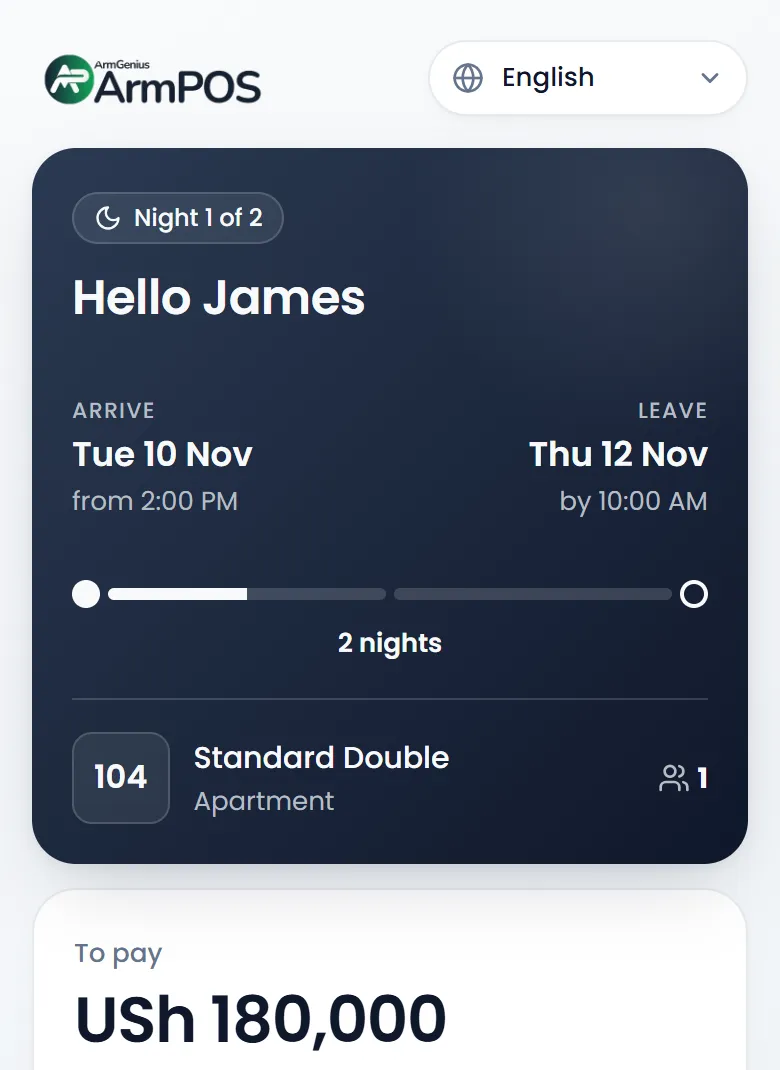
What the guest sees
- Hello and their first name, and which night of their stay it is.
- Arrive and Leave, with your check-in and check-out times.
- Their room, its type and how many guests.
- To pay, with See the bill: every night, every charge (Charged to the room for the till), every payment.
- A way to pay, when one is due: the deposit before arrival, or the bill during the stay. They pay by mobile money or card, on the page.
They choose their Language at the top. It starts in their phone's language.
Before they arrive, if their registration card isn't done, the page opens on the card first.
The guest can pay only once you've set up mobile money or a card gateway in Integrations. Until then the page tells them to contact you.
What's next
Still stuck?
Write to us and a person answers. If you already have a shop, Ask support inside it sends us the page you're on.
Contact usAsk your AI assistant
ChatGPT, Claude and Gemini can read every guide and walk you through it.
Set it up