




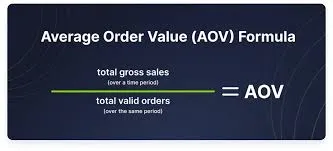

Average order value (AOV) is the average amount spent per sale: net sales for a period divided by the number of sales in it. It is one half of your sales figure, because sales = number of sales × AOV. A shop that took R 555,500 from 2,450 sales has an AOV of R 226.73.
This guide works AOV out from a till for an example cash-and-carry in Soweto, in rand. It shows why one big buyer can mislead you, and which ways to raise AOV at the till also raise profit.
How to calculate average order value
Divide the period's net sales by the number of finished sales. Net means after returns, and without charges that aren't for goods, such as delivery.
AOV = net sales for the period ÷ number of sales in the period
The Corporate Finance Institute defines it the same way: revenue for a period divided by the orders placed in it. The table settles what counts at a till.
| Item | In or out | Why |
|---|---|---|
| Finished sales, cash or on account | In | A sale on a customer's account is still a sale |
| Returns | Subtract their value | The goods came back; the original sale still counts as one sale |
| Delivery charges | Out | They pay for a service, not for goods |
| VAT | Your choice, the same every month | Switching between the two makes one month look better than it was |
| Held sales never finished | Out | They aren't sales until the customer pays or takes the goods |
| Deleted or cancelled sales | Out | They never happened |
For example, the Soweto shop's sales report shows R 571,300 for one month, including R 9,800 of delivery charges. Customers returned R 6,000 of goods. These are illustrative figures, not a real shop's.
| Line | Rand |
|---|---|
| Sales report total | 571,300 |
| Less delivery charges | 9,800 |
| Less returns | 6,000 |
| Net sales | 555,500 |
| Number of sales | 2,450 |
| AOV (555,500 ÷ 2,450) | 226.73 |
Why can one big buyer mislead you?
AOV is a mean, so a few large sales pull it far from what a typical customer spends. A shop that sells to households and to traders who buy to resell has two AOVs, not one.
For example, the Soweto shop's 2,450 sales come from two kinds of customer. Spaza shop owners buy in bulk to resell, and households buy for the week.
| Customers | Sales | Average sale | Sales value |
|---|---|---|---|
| Households | 2,300 | R 85 | R 195,500 |
| Spaza shop owners | 150 | R 2,400 | R 360,000 |
| All customers | 2,450 | R 226.73 | R 555,500 |
Neither group spends anything near R 227, and the blended figure moves with the traders. Lose 20 trader visits in a month and AOV falls 7.9%, to R 208.85. Get every household to spend R 10 more and it rises only 4.1%, to R 236.12.
So track AOV for each group, and use the median for households: the middle sale when all of them are sorted by size. For example, eleven sales on one morning came to R 45, 60, 65, 70, 80, 85, 95, 110, 140, 2,200 and 3,100.
Their mean is R 6,050 ÷ 11 = R 550, and their median is R 85. Nine of the eleven customers spent R 140 or less, so the median describes them and the mean describes nobody.
Why AOV only matters next to the number of sales
A higher AOV can hide a shrinking shop, because sales = number of sales × AOV. If AOV rises 8% while the number of sales falls 10%, sales fall 2.8%: 1.08 × 0.90 = 0.972.
Read three numbers together each month:
- Number of sales. Fewer sales with a higher AOV can mean small customers stopped coming.
- Gross margin. An AOV raised with discounts or bulk prices can lower profit.
- Conversion and revenue per visitor, if you count people coming in. Conversion is sales ÷ visitors, and revenue per visitor is conversion × AOV, so a change that raises AOV but loses buyers shows as a drop.
Seven ways to raise average order value at the till
Each way below adds to the basket without a price cut on everything. The AOV advice that ranks online comes mostly from online-shop software vendors, so test each tactic on your own sales before you keep it.
| Way | At the till | Profit check | In ArmPOS |
|---|---|---|---|
| Offer the matching item | Batteries with a torch, a trowel with cement | None needed: the extra item sells at full margin | The Product sales report, sorted by sale |
| Offer the bigger pack | The carton instead of the piece, the 10 kg bag instead of 2 kg | Compare profit per sale, since a pack often carries a lower margin per unit | Packs as units, with a pack picker on the cart line |
| Bundle items at a set price | A lunch box with a bottle, a school set | The bundle should earn more than its main item alone | A Combo Product |
| A price for bulk buyers | A lower price per unit for traders | It raises AOV and lowers margin, so price it from your margin | Wholesale Price on each cart line |
| A minimum-spend offer | R 5 off baskets of R 150 or more | The threshold test below | A promotion with a Minimum cart total |
| Free delivery above a basket size | For shops that deliver | The same threshold test, with the delivery cost as the discount | Shipping on the sale |
| Loyalty points spent at the till | Points earned on each sale, taken off a later one | Points are a discount: cost them as one | Available Points and Convert at the POS |
Price cuts across the whole shop are a different decision, with their own arithmetic in how to increase retail sales with POS data. Points as a reason to come back, rather than to spend more, are in how to build customer loyalty with a POS.
The threshold test: when a minimum-spend offer pays
A percentage off above a line pays on a customer only if their top-up earns more than the discount. Written out, gross margin × top-up must beat discount × threshold.
For example, the shop offers households 5% off baskets of R 150 or more, at an 18% gross margin. The top-up must beat 5 ÷ 18 of R 150, which is R 41.67. Only customers who would have spent less than R 108.33 can make it pay.
| Customer | Basket before | Basket after | Extra gross profit | Discount | Result |
|---|---|---|---|---|---|
| Tops up from R 90 | 90 | 150 | 10.80 | 7.50 | +3.30 |
| Tops up from R 120 | 120 | 150 | 5.40 | 7.50 | −2.10 |
| Already spends R 200 | 200 | 200 | 0 | 10.00 | −10.00 |
One customer who already spends R 200 cancels the gain from three who top up from R 90. A fixed R 5 off at the same line halves that cost and still pays on both top-ups: +R 5.80 from R 90 and +R 0.40 from R 120.
A field study of such offers points the same way. An online retailer's free shipping above a minimum order raised sales strongly. Yet lost shipping fees and customer groups who didn't respond made the offers unprofitable (Lewis, Singh and Fay, Marketing Science, 2006).
Keep the reward small against your margin: a fixed amount or a low-cost item, not a large percentage. If you're unsure of your margin, markup and margin converts one into the other.
Test each change before you keep it
Run one change at a time against a fair comparison, and keep it only if gross profit rose. This is an A/B test, done with weeks or branches instead of web pages.
- Pick one tactic, and one measure: gross profit per day, with AOV and the number of sales beside it.
- Compare like with like: four weeks with the change against the four before, or one branch with it against one without.
- Match the weeks of the month, because paydays move spending. For a seasonal range, compare with the same weeks last year.
- Keep the change only if gross profit rose, not just AOV.
How to track and raise average order value in ArmPOS
ArmPOS shows AOV for any dates and branch, and each of the seven ways has a matching screen or report. Each step links its Help center guide.
- Read AOV. The 3D Sales Dashboard shows Revenue, Orders and Avg Order for a date range and warehouse: Sales reports. Check it once against your own working, since returns and delivery charges change the figure.
- Split it by customer. The Sales Report lists each sale with its customer and who added it, and Filter narrows it to one customer. EXCEL exports it, and the MEDIAN function gives the typical sale.
- Check the end time. A range set to Today ends at 11:59:59, so set the time to the latest it offers before reading a day: Reports to check every day.
- Find the matching items. The Product sales report lists each product line with its sale's Reference, so sorting by Reference shows what leaves together.
- Run a minimum-spend offer. A promotion takes a percentage or a fixed amount, a Minimum cart total or item count, set hours and warehouses, and usage limits. Its Usage Report shows what it gave away: Promotions and promo codes.
- Bundle and price for bulk. A Combo Product sells a set of products you already stock (Products with variants). Each cart line switches between Retail Price and Wholesale Price (The POS screen).
- Let regulars spend points. Customers marked for loyalty collect points, and the cashier converts them into a discount at the till: Customers.
Promotions come with some plans only, and they work at the POS and on Add sale, not in the online store. The Starter plan is free, with no card needed, and the pricing page shows what each plan includes. Shops in South Africa can start from the local page.
Frequently asked questions
What is a good average order value?
No published figure fits a shop: the benchmarks come from online stores and differ by source. Compare your AOV with the same weeks last year, for each kind of customer.
Is AOV the same as average transaction value?
Yes, in a shop the two are the same. Basket size often means the number of items per sale, a separate figure worth tracking beside AOV.
Should AOV include VAT?
Either way works, as long as every month is worked out the same way. Leave delivery charges out and subtract returns.
Does a higher AOV mean more profit?
Not always. If the number of sales falls, or discounts and bulk prices cut the margin, profit can fall while AOV rises.
Work out last month's AOV for each kind of customer this week. To get the figures straight from your till, create a free ArmPOS account and open the 3D Sales Dashboard after a week of sales.


