




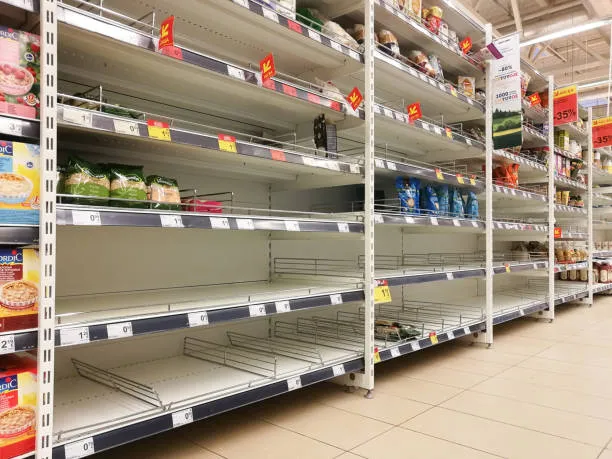

A stockout is the moment a customer wants a product and you have none to sell. It costs the sale and often the customer: about 4 in 10 shoppers who meet a gap buy elsewhere or not at all. The stockout rate measures how often it happens: products at zero, divided by products you stock, times 100.
This guide gives the stockout rate formula four ways, worked for one Nairobi minimarket in Kenya shillings. It shows why the store-wide rate can look fine while your best sellers run dry, and how to measure both in ArmPOS every week.
What Is a Stockout?
A stockout means a product is unavailable at the moment a customer is ready to buy it. The shelf is empty, the store room is empty, and nothing arrives before the customer leaves. "Out of stock" and "OOS" mean the same thing.
A stockout is different from low stock and from a backorder. The table separates the four states shop owners often mix up.
| State | What it means | For example |
|---|---|---|
| Low stock | Below the level where you reorder, but some still on the shelf | 6 packets of 2 kg sugar left, reorder level 10 |
| Stockout | None to sell when a customer asks | No 2 kg sugar at all, on the shelf or in the store room |
| Phantom stock | Your records show stock the shelf does not have | The system says 3 packets, the shelf has none |
| Backorder | The customer orders or pays now, and you deliver when stock arrives | A deposit on a fridge, delivered when the supplier's truck comes |
Phantom stock is the most dangerous of the four. No alert fires, because the records say you are fine, so the gap lasts until someone counts the shelf.
Stockouts are the opposite of overstocking, where you hold more than will sell before it ages or the cash is needed. Both cost money, but a stockout costs it in front of the customer.
Why Stockouts Matter
Stockouts matter because the shopper decides what happens next, and many choose another shop. In a worldwide study of grocery shoppers, 31% bought the missing item at another store and 9% did not buy it at all. Another 26% switched brand, 19% took another size or variety, and 15% bought it later.
The same study, by Gruen, Corsten and Bharadwaj in 2002, put the average out-of-stock rate at 8.3% and the sales lost to stockouts at 3.9%. Corsten and Gruen summed it up in Harvard Business Review as stock-outs cause walkouts.
Those figures come from supermarket studies, mostly in Europe and the United States, so treat them as a starting point. A shopper in a busy market who can buy from the next stall has even less reason to wait for you.
Each lost sale also teaches the customer where else to shop. That is why a gap costs more than the margin on one item, and why the stockout cost guide counts the money layer by layer.
Stockout Rate: What It Is and How to Calculate It
The stockout rate is the share of your products, or of your customers' requests, that you could not fill. It turns "we keep running out" into a number you can watch fall week by week.
A high rate means customers often meet gaps. A low rate for the whole shop can still hide a problem, as the example below shows.
Stockout Rate Formula
The usual formula counts the products at zero at one moment:
Stockout rate = (number of products out of stock ÷ total number of products you stock) × 100
Three other versions answer different questions. Pick one and keep it, or your rate will move because the formula changed rather than the shelves.
| Measure | Formula | What it tells you |
|---|---|---|
| Products at zero now | products at zero ÷ products stocked × 100 | How full the shop looks today |
| Best sellers at zero now | best sellers at zero ÷ number of best sellers × 100 | Whether the gaps are costing money |
| Product-days at zero | days each product spent at zero, added up ÷ (products × days) × 100 | How long the gaps last over a month |
| Requests turned away | requests you could not fill ÷ all requests × 100 | How many customers met a gap |
Online shops often use unfilled orders divided by total orders. That is the last row, counted on a website instead of at a counter.
Stockout Rate Example
If your store carries 500 products and 25 of them are out of stock, the stockout rate is (25 ÷ 500) × 100 = 5%. One product in twenty on your list can't be sold today.
For example, take a minimarket in Nairobi that stocks 400 products. The owner exports the stock list on a Saturday evening and keeps a notebook at the till for a week. The four measures give four different answers.
| Measure | Numbers | Stockout rate |
|---|---|---|
| Products at zero on Saturday evening | 12 ÷ 400 × 100 | 3% |
| Best sellers at zero (the top 40 by sales) | 4 ÷ 40 × 100 | 10% |
| Product-days at zero over 30 days | 180 ÷ (400 × 30) × 100 | 1.5% |
| Requests turned away in one week | 60 ÷ 2,400 × 100 | 2.5% |
The 3% looks healthy. The 10% is the number that costs money. Four of the shop's 40 best sellers are missing, and together they normally sell KES 9,600 a day.
Two days at zero puts KES 19,200 of sales at risk on those four products alone. The eight slow items also at zero may not cost a single sale this week.
The request count comes from the notebook: the shop sold 2,340 items that week and turned 60 requests away, so customers asked for 2,400. No till records a customer who leaves without buying, so only the notebook could show it.
Watch the best-seller rate every week
Measure the best-seller rate every week and the whole-shop rate once a month. Your best sellers come from your sales report, and the 80/20 rule in inventory shows how to rank them.
Compare yourself with the study's 8.3% only on the first measure, the share of products at zero when you check. The other three measure different things and give lower numbers.
What Causes Stockouts?
Most stockouts start inside the shop: wrong records, buying by feel, or a reorder placed too late. Supplier and transport problems are real too, but they hurt most when the shop had no buffer to absorb them.
- Inaccurate inventory records. Theft, breakage and miscounts make the system show stock the shelf lacks. Customers find the gap before any report does.
- Poor demand forecasting. Buying the same amount every month ignores school terms, festive weeks and paydays. A shop that averages its sales over days when the product was out will under-order again.
- Supplier delays. A distributor's van that skips a week, or a supplier out of stock itself, stops the delivery you counted on. Write down how many days each delivery really takes.
- Manufacturing issues. A factory shutdown or a raw-material shortage reaches the shelf weeks later, through every wholesaler at once. Shops that buy from one source feel it first.
- Logistics problems. Roads close in the rains, trucks queue at borders such as Malaba, and imports wait at Mombasa or Dar es Salaam. Each delay adds days your reorder point must cover.
- Cash. A shop that can't pay the supplier on the day stops ordering, even after the alert has fired. Money tied up in slow stock or in customers' credit can't buy the best sellers.
A stockout is a symptom. Find which link failed before you buy more of everything.
When Stockouts Are OK (And Even Good)
A stockout is fine when the product would cost more to keep than to miss. That holds for four kinds of goods, as long as the customer still finds something else to buy from you.
- Fresh products. Bread, milk, mandazi and fresh fish should sell out by closing. An empty tray at 8 pm means nothing went to waste.
- Seasonal or limited stock. School uniforms after term opens and Christmas decorations after the 25th should run out on purpose. Leftovers wait a year or get sold at a loss.
- Tech and auto models. Phones, TVs and spare parts change models. Running out of the old model just before the new one lands avoids stock nobody wants.
- Scarcity marketing. A limited run of a fabric print or a sneaker drop sells faster because customers know it won't come back. It works only when the product is truly limited.
The test is the customer's next move. If a planned gap sends a regular to your competitor for everything else on their list, it was not planned well.
How to Reduce or Prevent Stockouts
Most stockouts can be prevented with five habits, although some stockouts are hard to avoid completely. That guide works the whole method through for one product; here is the short list.
- Keep inventory records accurate. Count your fast sellers every week or two, one shelf at a time, and correct the system the same day. Phantom stock disappears only when someone counts.
- Improve demand forecasting. Use last year's sales for the same weeks before term starts, before festive seasons and around paydays. The guide to inventory forecasting methods shows how.
- Monitor your supply chain. Log each order's date and its delivery date. A supplier who averages 4 days but sometimes takes 9 needs a bigger buffer, or a second supplier for your best sellers.
- Use safety stock. Keep a buffer for late deliveries and busy days. The simplest formula is below.
- Reorder early. Set a reorder point for each product you buy again, and order the day stock reaches it.
Safety stock = (maximum daily sales × maximum lead time) − (average daily sales × average lead time)
For example, a product sells 10 a day on average and 15 on its busiest day. Delivery takes 4 days on average and 6 at worst.
Safety stock is (15 × 6) − (10 × 4) = 90 − 40 = 50 units. The reorder point is 10 × 4 + 50 = 90 units.
This formula is cautious: it plans for your busiest day through your slowest delivery. That suits must-have products, and the overstocking guide compares two lighter ways to size the buffer for the rest.
How to track stockouts in ArmPOS
ArmPOS watches your stock levels and warns you; it does not place orders for you. These six steps set it up and give you the weekly rate.
- Set a Stock Alert on each product you reorder. It sits in the product form's Inventory part, and your reorder point is the number to enter. See Add your first products.
- Turn on stock alerts. Click the bell, then Turn on, and in My notifications switch on "Stock fell below its alert level" for the bell, email or push. ArmPOS checks stock every 10 minutes (Get alerts on your phone).
- Read Product Quantity Alerts every morning. Under Reports, it lists each product at or below its Stock Alert, by warehouse. A product with no alert set appears once it reaches 0 (Reports to check every day).
- Measure the rate once a week. Open Reports › Stock Report, choose the warehouse and export it to Excel. Count the rows where Current Stock is 0 and divide by the number of rows (Stock reports).
- Measure the best-seller rate. Reports › Top Selling Products for the last 30 days lists your best sellers. Check how many of them sit at 0 in the alerts list (Sales reports).
- Catch phantom stock. Make a Count Stock sheet for one category, count the shelf, and correct the difference with an adjustment (Count and adjust stock). Keep Allow_Overselling off in POS Settings, so the till won't sell what the warehouse doesn't hold.
The steps are the same for a minimarket in Kenya and a duka in Tanzania, and for each branch on its own.
Frequently asked questions
What is the difference between a stockout and a backorder?
In a stockout the customer leaves without the product. In a backorder the customer orders or pays now and you deliver when stock arrives, so the sale is kept.
What is a good stockout rate?
There is no standard for small shops. The worldwide grocery study found 8.3% of products out of stock on average. Aim well below that on your best sellers, and watch the trend.
Is out of stock the same as a stockout?
Yes. "Out of stock", "OOS" and "stockout" all mean you have none of the product when a customer wants it.
How often should I measure my stockout rate?
Measure the best-seller rate every week and the whole-shop rate once a month. Measure at the same time of day each time, because stock is lowest just before a delivery.
Can a product show in stock and still be a stockout?
Yes, that is phantom stock: the records say you have it and the shelf doesn't. Only a count finds it, so count your fast sellers often.
Start with your 40 best sellers this week and count how many are at zero. Keep a notebook at the till for the requests you turn away. Create a free ArmPOS account to set a Stock Alert on each one, so the bell warns you before the shelf is empty.


